4 DNS Records to Get Business Email on Your Domain for UK SMEs

A business email with a domain is nothing more complicated than local-part@yourdomain, and the fastest way to get one is to register or connect your domain today and add MX plus SPF and DKIM records, with DMARC strongly recommended. Get those four settings right and your emails land in inboxes rather than spam folders.
TL;DR:
- Most small businesses should prioritize adding a dedicated domain-based email to build trust with customers and partners, especially for invoicing and first contact.
- Expect to spend around £70 to £110 per year for a domain and a single mailbox, with full productivity suites costing more per user per month.
- Proper setup requires verifying domain ownership and adding MX, SPF, DKIM, and DMARC records accurately, with DNS propagation potentially taking up to 48 hours.
- Testing email authenticity involves checking for SPF and DKIM pass marks in message headers, and delays during propagation can cause temporary deliverability issues.
- Managing addresses as role-based forwards and registering domains in your own name help maintain control and simplify future provider migrations.
Table of Contents
- What is a business email with domain, and why does it matter?
- What does a business email with a domain actually cost?
- How do you choose the right email provider?
- How do you set up a business email with your own domain?
- How do you test SPF and DKIM to fix deliverability problems?
- How should you manage addresses and aliases for your team?
- How do you keep control of your domain and migrate providers safely?
- Your one-page email setup checklist
- How does business email fit with the tools you already use?
- What compliance and privacy rules apply to business email?
- Publisher perspective: what building hundreds of small business sites teaches you about email
- Get your business email live without the DNS headache
- Sources
- FAQ
What is a business email with domain, and why does it matter?
Every email address has two halves: the bit before the @ symbol (the local-part, like “sarah” or “sales”) and the bit after it (your domain, like “mybusiness.co.uk”). Together they form the address format governed by long-standing internet standards, which is why oddities like spaces or unsupported characters get rejected before your message even leaves the building. When that domain half is yours rather than a free provider’s, every email you send is a small advert for your brand.
The credibility gap here is real and well documented. A business email address that carries your company domain builds trust and reinforces brand identity in a way “yourbusiness247@gmail.com” simply cannot. Customers notice. Suppliers notice. So do the recruiters and lenders you’re trying to impress.
Here’s the bit that surprises people: if you run a UK limited company, Companies House only requires a registered, appropriate email address — not a custom domain. A monitored Gmail account technically satisfies the law. But “technically legal” and “good for business” are two very different bars to clear.
A domain-based address earns its keep most in these moments:
- Sending invoices and quotes that need to look legitimate
- Applying for business bank accounts or credit terms
- Recruiting, where a scruffy free email address can quietly cost you good candidates
- Any first contact with a new customer, where trust is decided in seconds
What does a business email with a domain actually cost?
For most UK small businesses, expect to pay somewhere in the region of £70 to £110 a year for a domain plus a single mailbox on a mainstream provider. That’s the unglamorous truth: it’s rarely the domain that costs you money, it’s the mailbox subscription running month after month.
Rough shape of the spend:
- Domain registration: a .co.uk domain typically runs from a few pounds up to around £15 to £20 a year, depending on the registrar and any renewal price hikes
- Full productivity suite mailboxes (Google Workspace, Microsoft 365): usually priced per user, per month, and bundled with cloud storage, video calls and office apps
- Email-only hosting: cheaper, no-frills mailbox hosting that skips the apps and just handles mail
Bundle pricing changes the maths. If you’re already paying for a website build that includes hosting, adding email through the same provider often works out cheaper in year one than buying domain, website and email separately from three different companies.
A quick reality check on picking between the two mailbox types: if you’re a sole trader who just needs to send and receive mail reliably, an email-only host is fine. If your team lives in shared documents, video calls and calendars, a full suite earns its higher price tag fast.
How do you choose the right email provider?
The three usual suspects are Google Workspace, Microsoft 365, and smaller UK-focused mailbox hosts. None of them is universally “best” — it depends on how your business actually works day to day.
Weigh these criteria before signing anything:
- Cost per user, per month — and whether that price includes storage, apps, or just the mailbox
- Apps included — do you need shared documents and video calls, or purely email?
- Data residency — some businesses, particularly those handling sensitive client data, prefer a provider that stores data within the UK or EU
- Support hours — can you get help on a Sunday evening when something breaks, or only during office hours?
- Migration assistance — will the provider help move existing mail and contacts, or are you on your own?
- Admin simplicity — can one non-technical person manage users, or does it need a dedicated IT person?
For a sole trader or a team of two or three, the temptation is to over-buy. A single mailbox on a lean, email-focused host often does everything a five-person productivity suite does, minus the apps you’ll never open.
Pro Tip: Sign up to your chosen email provider before you touch your domain’s DNS settings. The provider gives you the exact MX, SPF and DKIM values to enter — trying to guess them or copy them from a different provider’s guide is the single most common cause of a broken setup.
Whichever route you choose, the Proton Mail approach to custom domains is worth a mention for businesses that put privacy and security ahead of collaboration apps — a smaller pool of providers, but a genuinely different value proposition.
How do you set up a business email with your own domain?
This is where most guides get vague. Here’s the exact sequence, in order, with no steps skipped.
- Register or confirm ownership of your domain. If you don’t have one yet, buy it. If you already do, log in to your registrar account and check you (not a web designer from three years ago) hold the login. Registering independently, rather than through a website builder that bundles the domain into its own account, keeps the domain portable if you ever switch providers.
- Sign up to your chosen email provider. Google Workspace, Microsoft 365, or a UK email host will ask you to verify domain ownership, then hand you a set of DNS values specific to your account.
- Add the MX record. This tells the internet which servers handle mail for your domain. Get this wrong and mail simply won’t arrive anywhere.
- Add the SPF record (a TXT record) to declare which servers are allowed to send mail on your domain’s behalf, stopping spammers from impersonating you.
- Add the DKIM record (usually TXT or CNAME) to digitally sign outgoing mail, proving it genuinely came from your domain and wasn’t tampered with in transit.
- Add the DMARC record (TXT) to tell receiving servers what to do if a message fails SPF or DKIM checks. This one is technically optional but strongly advised.
- Save your changes and wait for DNS propagation. This can take anywhere from a few minutes to 48 hours, though most changes settle within a couple of hours.
- Verify and send test messages. Use your provider’s built-in DNS checker, then send a real test email to a Gmail and an Outlook address to confirm everything lines up.
The four-record requirement, MX, SPF, DKIM and DMARC, is standard guidance and skipping any of them frequently results in mail being marked as spam or bounced outright by major providers.
| DNS Record | Type | What It Does | If Missing |
|---|---|---|---|
| MX | Mail Exchange | Routes incoming mail to your provider’s servers | Mail cannot be received at all |
| SPF | TXT | Lists servers authorised to send mail for your domain | Mail more likely flagged as spam |
| DKIM | TXT/CNAME | Digitally signs outgoing mail to prove authenticity | Mail more likely flagged as spam or spoofed |
| DMARC | TXT | Sets the policy for handling mail that fails SPF/DKIM | Weaker protection against domain spoofing |
The most common setup errors are frustratingly small: extra quotation marks copied in by accident, a stray trailing space, or the record added as the wrong type (a TXT record entered as a CNAME, for example). Delete the record, re-copy the exact string from your provider’s dashboard, and re-add it. Nine times out of ten, that fixes it.
How do you test SPF and DKIM to fix deliverability problems?
Once your records are live, don’t just assume it worked. Send yourself a test email and check the headers.
In Gmail: open the message, click the three-dot menu, and select “Show original.” Look for the lines reading spf=pass and dkim=pass.
In Outlook: open the message, then find “View message source” (or “Internet headers” depending on version) and look for the same spf=pass and dkim=pass markers.
If you see “fail” or “neutral” instead:
- Double-check you copied the exact value your provider gave you, with no extra characters
- Confirm the record type matches what was requested (TXT versus CNAME trips people up constantly)
- Check the TTL (time to live) setting hasn’t left an old, incorrect record cached somewhere
- Use your provider’s own DNS diagnostic tool, most have one, to see precisely what it’s reading
Pro Tip: Before you panic and start deleting records, check the clock. If you made changes less than an hour ago, the failure might simply be DNS propagation still working through the system rather than a genuine mistake. Wait, then retest.
If it’s still failing after 48 hours and you’ve triple-checked every value, that’s the point to contact your provider’s support team rather than keep guessing.
How should you manage addresses and aliases for your team?
Not every person on your team needs their own full mailbox subscription. Aliases forward mail to an existing inbox without the extra monthly cost, and they’re perfect for addresses like info@ or sales@ that several people might monitor.
A few sensible rules of thumb:
- Use firstname@yourdomain for individuals and role@yourdomain (info@, sales@, support@) for shared functions
- Set role addresses to forward into a shared mailbox or distribute to a small group, rather than creating a full account for each
- When someone leaves, don’t delete their mailbox immediately, forward it to their replacement or a manager first to avoid losing client conversations
- Turn on two-factor authentication for every account, especially admin logins, since a compromised email account is often the first domino in a wider breach
- If you’re on a paid tier, check the provider’s data processing agreement, particularly if you handle customer data covered by UK data protection rules
How do you keep control of your domain and migrate providers safely?
Register your domain in your own name, through your own registrar account, separate from any website builder or hosting company. It sounds like a small detail. It isn’t. Businesses that let a web agency register the domain “on their behalf” routinely discover, years later, that switching suppliers means a fight to get their own domain back.
If you do need to migrate to a new email provider, follow this order rather than switching everything at once:
- Provision the new mailboxes first, before touching any DNS settings
- Add the new provider’s MX, SPF and DKIM records alongside the old ones
- Lower the priority of the old MX record so new mail starts routing to the new provider
- Test thoroughly, sending and receiving from both old and new addresses for a few days
- Only once everything’s confirmed working, remove the old provider’s DNS records
Done in that order, migration is close to invisible to your customers. Done in the wrong order, you risk a week of bounced emails and missed enquiries. If juggling DNS records isn’t how you want to spend an afternoon, a managed hosting and domain transfer service can handle the technical steps for you.
Your one-page email setup checklist
How does business email fit with the tools you already use?
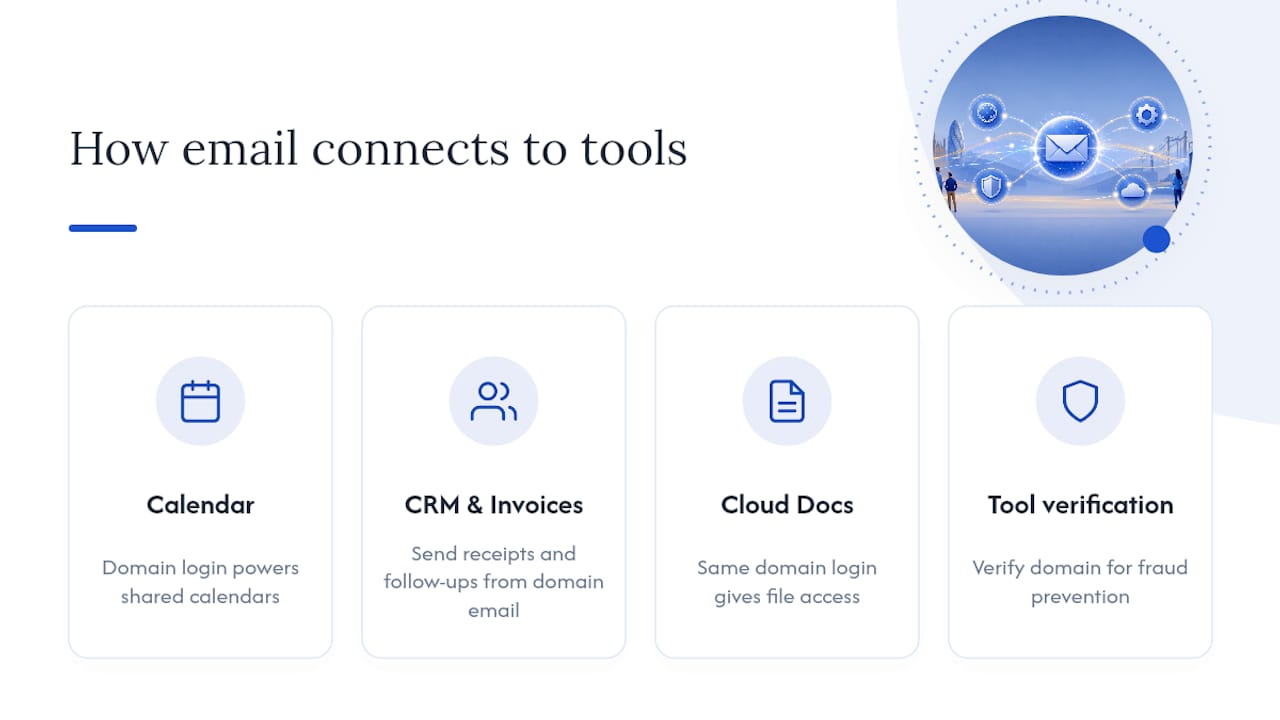
Your email domain rarely lives in isolation. Once it’s set up, it becomes the login and identity layer for a good chunk of your other business tools, which is exactly why getting it right early pays off later.
Calendar and video call tools typically piggyback on the same login as your email, whether that’s through Google Workspace or Microsoft 365, so a shared team calendar or meeting booking link uses your domain identity automatically. Customer relationship management systems and invoicing software also frequently ask for a business email during setup, and use that address to send automated receipts, quotes and follow-ups on your behalf, meaning a scruffy free address ends up baked into every customer touchpoint whether you intended it or not.
Cloud storage and document sharing tend to follow the same pattern. A Microsoft 365 or Google Workspace mailbox usually comes bundled with cloud storage under the same domain login, which means one password gets your team into email, files and shared documents rather than juggling separate accounts for each. Social media scheduling tools, accounting software, and even some point-of-sale systems increasingly ask you to verify a business email domain as part of fraud prevention, so having one ready from day one smooths out onboarding across the board rather than becoming a scramble every time you sign up for something new.
What compliance and privacy rules apply to business email?
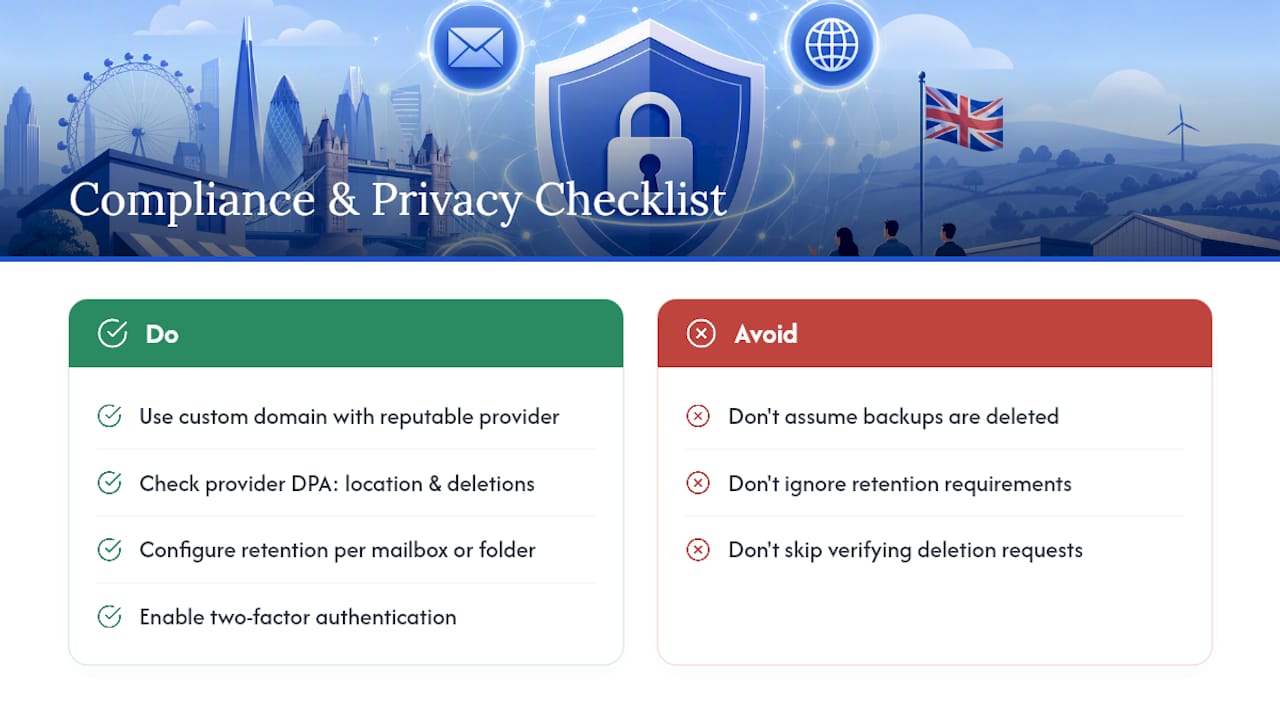
If your business handles customer data through email, and almost every business does, UK data protection law applies regardless of whether you’re using a free address or a custom domain. The rules don’t change based on what comes after your @ symbol, but a domain-based setup with a reputable provider generally makes compliance easier to demonstrate.
Check what your provider’s data processing agreement actually covers, particularly around where data is stored and how long deleted messages persist on backups. This matters more than it sounds: if a customer asks you to delete their information under their data protection rights, you need to know your provider can actually action that request, not just archive it somewhere you can’t reach.
Retention policies deserve a look too. Financial and contractual emails often need keeping for several years for tax or dispute purposes, while marketing correspondence might need deleting sooner if a customer withdraws consent. Most mainstream providers let you set retention rules per mailbox or per folder, but the defaults rarely match what a small business actually needs, so it’s worth an hour checking the settings rather than assuming they’re already correct. Two-factor authentication, mentioned earlier for basic security, also does double duty here: a breached account is a data breach, and regulators take a dim view of businesses that could have prevented it with a setting that takes two minutes to switch on.
Publisher perspective: what building hundreds of small business sites teaches you about email
Most email setup problems Basic-bs sees aren’t technical, they’re ordering problems. Someone buys a domain through one company, a website through another, and email through a third, then nobody can agree who’s meant to hold the DNS keys. A managed build that includes domain sourcing and transfer, hosting and ongoing updates handled as one job, live in five to seven working days, can help avoid that mess before it starts. If your time is tight and continuity matters more than tinkering, a managed build removes the guesswork entirely.
— Conor
Get your business email live without the DNS headache
There’s a real cost to doing email setup alone: hours lost to DNS panels, a support ticket when SPF still says “fail,” and the nagging worry you’ve missed a record. Some web design packages bundle domain sourcing and transfer, full email configuration (MX, SPF, DKIM and DMARC done properly, first time), hosting with SSL, and ongoing monthly updates, sometimes offered for one fixed monthly price with zero upfront fees.
Turnaround can be as short as five to seven working days instead of weeks of back and forth. No hidden setup charges, no surprise renewal shock, just a working website and a professional inbox that both carry your domain from day one. Take a look at our website packages and pricing to see what’s included, or head to why cheap website builds fail if you want the fuller argument for doing this properly the first time. Ready to get started? Get in touch and we’ll have your domain, hosting and email sorted within the week.
Sources
- Gov
- Business email address (Microsoft 365)
- Do I need a professional email address for my small business UK? (Duport)
- What is an email domain (Proton)
FAQ
Can I get a free business email with a domain?
Not entirely free, since you’ll always pay for the domain itself, but some providers offer free email forwarding to an existing inbox once you own the domain, which is a low-cost way to get a domain-based address without a paid mailbox subscription.
How do I get a business email with a domain?
Register or confirm ownership of your domain, sign up to an email provider like Google Workspace or Microsoft 365, then add the MX, SPF and DKIM records they give you (DMARC recommended) and wait for DNS propagation, which typically takes minutes to 48 hours.
Is info@ a good business email address?
Yes, info@yourdomain is a sensible-shared address for general enquiries, but pair it with individual firstname@ addresses for staff and dedicated role addresses like sales@ or support@ for specific functions, rather than routing everything through one inbox.
How much does a business email domain cost?
Most UK small businesses pay roughly £70 to £110 a year for a domain plus one mailbox on a mainstream provider, though bundling email with an existing website hosting package can bring the first-year cost down further.