Event hosts: Build an RSVP website in an afternoon, free or bespoke

For most weddings, parties and work dos, a free or low-cost RSVP builder gets you a working link in an afternoon, and that’s the right call when your needs are simple. If you need custom branding, password protection, multi-event logic or someone else to just handle it, a bespoke site from a service like Basic-bs is worth the extra day or two. Either way: pick your route today and publish something guests can actually click.
TL;DR:
- Simple RSVP tools are sufficient for basic events but may lack multi-event support, branding, or password protection needed for complex weddings or corporate functions.
- Key features to consider include meal and dietary options, household-level responses, immediate confirmation, and export capabilities for smooth guest list management.
- Setting up an RSVP page quickly requires defining data needs first, building a landing page before the form, and thoroughly testing the process on mobile devices.
- Sharing methods like short links, QR codes, and well-timed reminders ensure higher response rates and easier guest communication.
- For events with specialized needs, opting for a custom-built site from a service like Basic-bs offers better control, branding, and privacy compared to free or template-based tools.
Table of Contents
- What does an event RSVP website actually do?
- What features actually matter before you commit?
- How do you set up an RSVP page quickly?
- Sharing RSVPs and chasing replies without losing your mind
- What should you check about data, exports and privacy?
- When do you need a developer instead of a free RSVP tool?
- How Basic-bs handles event RSVP websites
- Sources
- FAQ
What does an event RSVP website actually do?
An event RSVP website replaces the group chat chaos and the “did Auntie Jean reply yet?” spreadsheet with one central page guests visit to confirm attendance. That’s the whole job, done properly: one link, one form, one source of truth.
The best ones share a common backbone. Guests hit a landing page with the date, time and venue, then fill in a short form that captures attendance status, names, plus-ones and any custom questions you’ve added, like dietary needs or song requests. Behind the scenes, you get a host dashboard that totals everyone up in real time, so you’re never manually adding names to a list at 11pm.
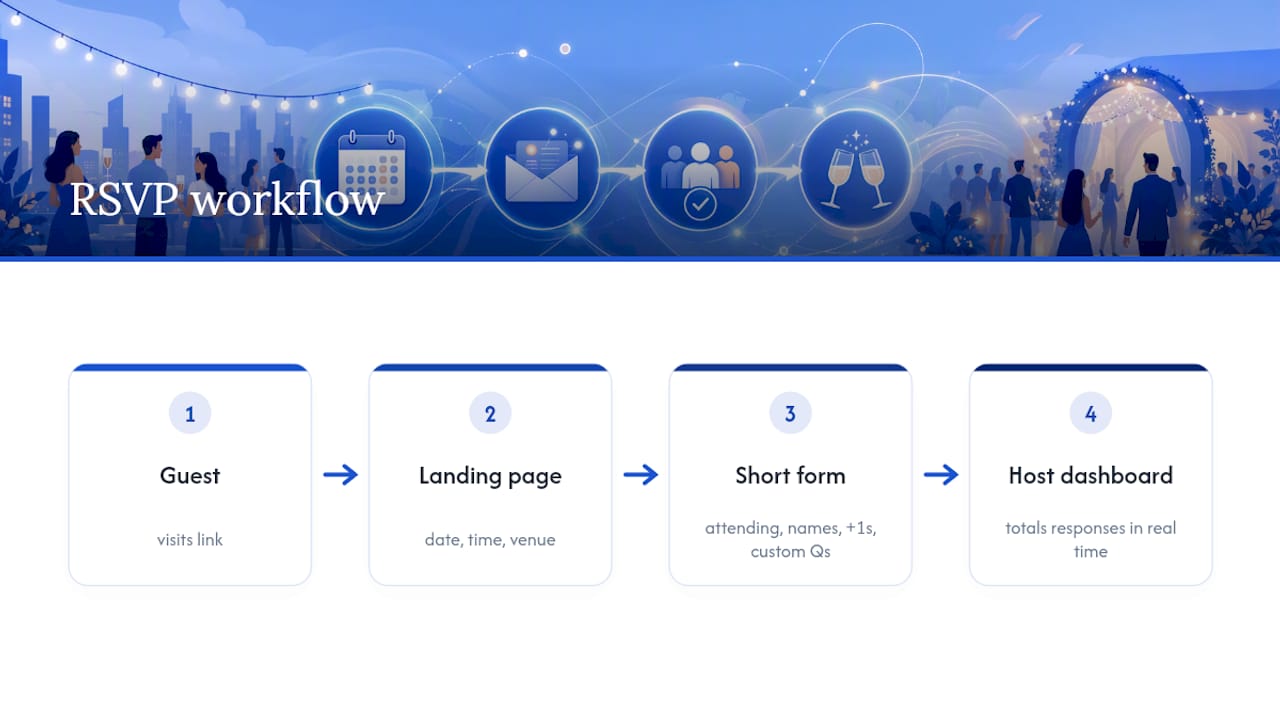
Different events lean on different bits of that toolkit. A wedding usually needs multi-event support, because guests might be invited to the ceremony, the evening reception, or both, and meal tracking matters once caterers need final numbers. A corporate conference might need session selection instead, so attendees can pick which talks they’re attending, or ticketing if there’s a paid element. A birthday party or christening barely needs any of that. The features exist because different events genuinely create different admin headaches, not because more boxes always mean a better tool.
What all of them fix is the same underlying problem: scattered replies. Texts, emails, a comment on the Facebook event, someone’s mum ringing you directly. Every one of those is a separate data point you have to remember and reconcile by hand. A single RSVP page collects everything in one place automatically, and guest-list guides consistently flag this as the difference between a headcount you trust and one you’re guessing at three days before the caterer needs numbers.
What features actually matter before you commit?
Not every RSVP tool needs every feature. What matters is matching the feature set to what your event will actually demand of it, and comparisons of RSVP platforms generally recommend judging tools by category rather than chasing one universal “best” option.
At the bare minimum, your form needs to capture attendance (yes, no, maybe), the guest’s name, and a way to contact them. Everything past that is where tools start to differ:
- Meal choices and dietary needs for anything with catering involved.
- Accessibility requirements, so venues can plan for wheelchair access or seating needs in advance.
- Plus-one rules, ideally capped per invite rather than left open, or you’ll end up with mystery guests turning up unannounced.
- Party or household-level RSVPs, so a family of four responds once instead of submitting four separate, possibly conflicting, forms.
That last point matters more for weddings than almost anywhere else. When invites go to households rather than individuals, party-level RSVP controls stop you getting three “yes” replies and one silent no-show from the same family. Guidance on guest-list workflows treats this as one of the most reliable ways to cut vendor friction, particularly when seating charts or exact meal counts are on the line.
Confirmation flow matters too, and it’s easy to overlook. A guest submits the form, and they should immediately see (and ideally receive by email) a confirmation that their response landed. Mobile-first design isn’t optional here either, since most guests will open your link on a phone, and clunky, slow-loading forms are a direct cause of people abandoning them halfway through, according to practitioner guides on form completion.
Finally, check what you can get out of the tool, not just what you can put in. Look for CSV or Excel exports, calendar integration, payment support if there’s a ticketed element, and password protection if the event is private. These sound like back-office details until the week before the event, when you’re the one trying to hand a clean guest list to a caterer.
How do you set up an RSVP page quickly?
You can have a working RSVP link live within a few hours if you follow a sensible order rather than jumping straight to form-building.
- Decide what data you actually need, and set your deadline first. Work backwards from your vendor cutoffs, not forwards from today. If your caterer needs final numbers three weeks out, your RSVP deadline needs to sit before that, with enough buffer to chase stragglers. Guest-list planning advice consistently recommends setting the deadline against the tightest vendor requirement, then working reminders in around it.
- Build your landing page first, before the form. Get the date, time, location and a clear call to action visible immediately. Guests should know what they’re confirming before they’re asked to confirm it.
- Build a short form with only the fields you decided you need. Add conditional logic if your tool supports it, so a “not attending” response skips the meal-choice question entirely rather than showing it uselessly.
- Test it from both sides before you send anything. Submit a few sample responses yourself, covering attending, declining, and a plus-one, then check the host dashboard updates correctly and that confirmation messages actually arrive. Step-by-step tutorials on building RSVP sites treat this dual test as a non-negotiable step before publicising a link, and it’s the single easiest way to catch a broken form before your guests do.
- Publish and share. Send the link, generate a QR code for printed invites if you’re using them, schedule your first reminder, and export an initial headcount report so you know where you stand.
Pro Tip: Run your first test submission as if you’re the most awkward guest possible: decline, add a plus-one you shouldn’t have, leave optional fields blank. If the form survives that, it’ll survive your actual guest list.
Sharing RSVPs and chasing replies without losing your mind
How you share the link matters almost as much as the form itself. A short, memorable link works well in a text or a WhatsApp message. A QR code printed on physical invites is brilliant for older relatives who’d rather scan than type a URL. Email works for anything semi-formal, and it’s the easiest channel to attach a calendar file to. SMS gets the highest open rates by far, but it’s the most annoying channel to use for reminders if you overdo it.
A sensible reminder cadence looks something like this:
- First reminder at the halfway point between invite and deadline.
- Second reminder a week before the deadline, targeted only at non-responders.
- Final chase two or three days before the deadline, by whichever channel that guest hasn’t responded to yet.
Your host dashboard should let you filter for pending guests specifically, rather than scrolling the whole list every time. When someone replies by phone or hands you a paper RSVP at the school gates, log it into the same master list immediately. Guidance on guest-list management is blunt about this: split data streams, one digital and one in your head, are how headcounts go wrong; for practical event hosts, using a consistent checklist is key to success, as explained in this background piano music events checklist. Keep everything mobile-friendly throughout, and check your form still reads cleanly at a small screen size, because that’s where most guests will actually be opening it.
What should you check about data, exports and privacy?
Before you commit to any tool, confirm you can actually get your data back out of it in a usable form. This isn’t a hypothetical concern. It’s the difference between handing your caterer a clean spreadsheet the week of the event and manually retyping forty names from a screen.
- Export formats: confirm CSV or Excel exports include plus-one totals and any custom fields you’ve added, not just names and yes/no answers.
- Privacy controls: check for password protection on the RSVP page itself, private shareable links rather than public ones, and permission roles if you need to give a co-organiser or vendor limited access.
- Portability: ask, before you build anything, whether you can export your full guest data if you decide to leave the platform later. A tool that locks your list in is a tool you shouldn’t trust with a wedding guest count.
None of this is exciting. All of it is the sort of thing that saves you a genuinely stressful evening a week before the event.
When do you need a developer instead of a free RSVP tool?
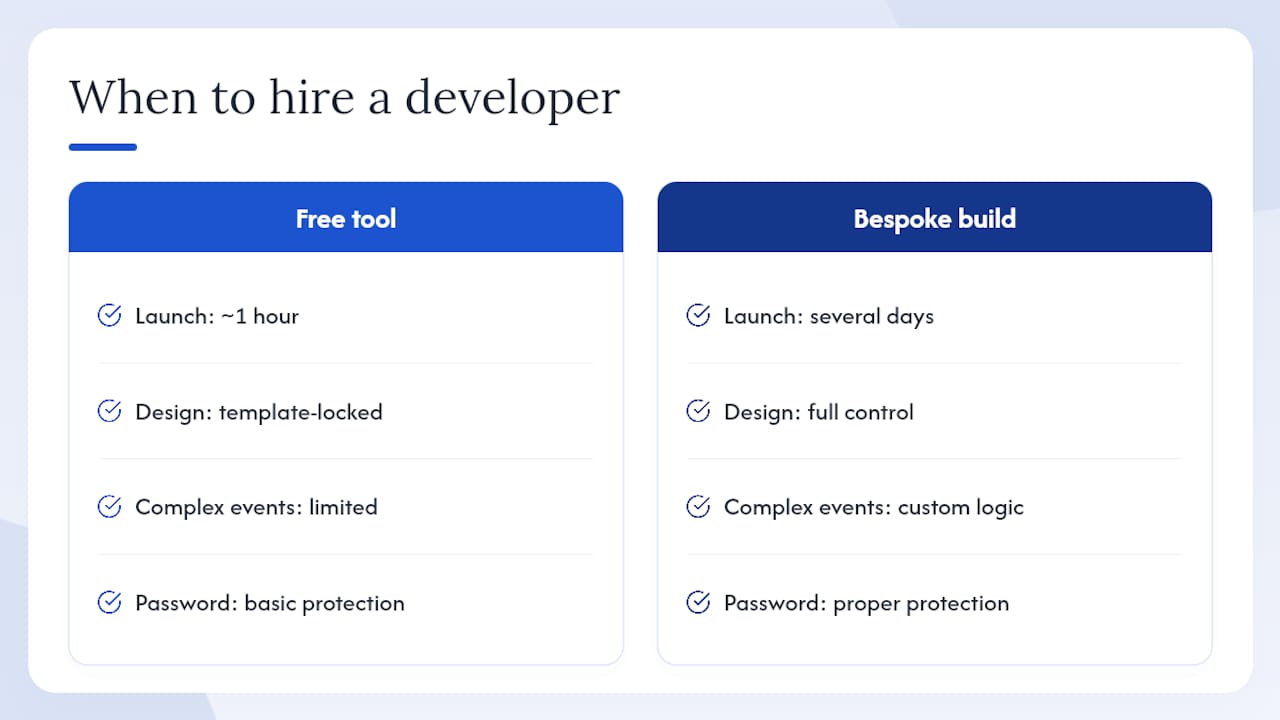
Free RSVP builders are brilliant for straightforward events, and there’s no shame in using one for a fortieth birthday or a work Christmas do. Where they start to strain is complex branding, multi-event logic across a wedding weekend, proper password protection for a private guest list, or integration with a booking or payment system beyond basic ticketing.
That’s the point where the trade-off shifts. A free tool gets you live in an hour but locks you into its templates and its limits. A bespoke build takes longer, typically several days rather than minutes, but you get design control, custom logic and someone accountable if something breaks close to the date. For an event with real complexity, a build from a service like Basic-bs, with turnaround measured in days rather than weeks, tends to be the more sensible spend than fighting a free tool into doing something it wasn’t built for.
— Conor
How Basic-bs handles event RSVP websites
There are solid free RSVP builders out there, and this article has walked through how to use them well. But if your event needs proper branding, guest-list logic across multiple dates, or a password-protected page that isn’t sat on a generic template, a cheap website that actually works beats a free tool stretched past its limits.
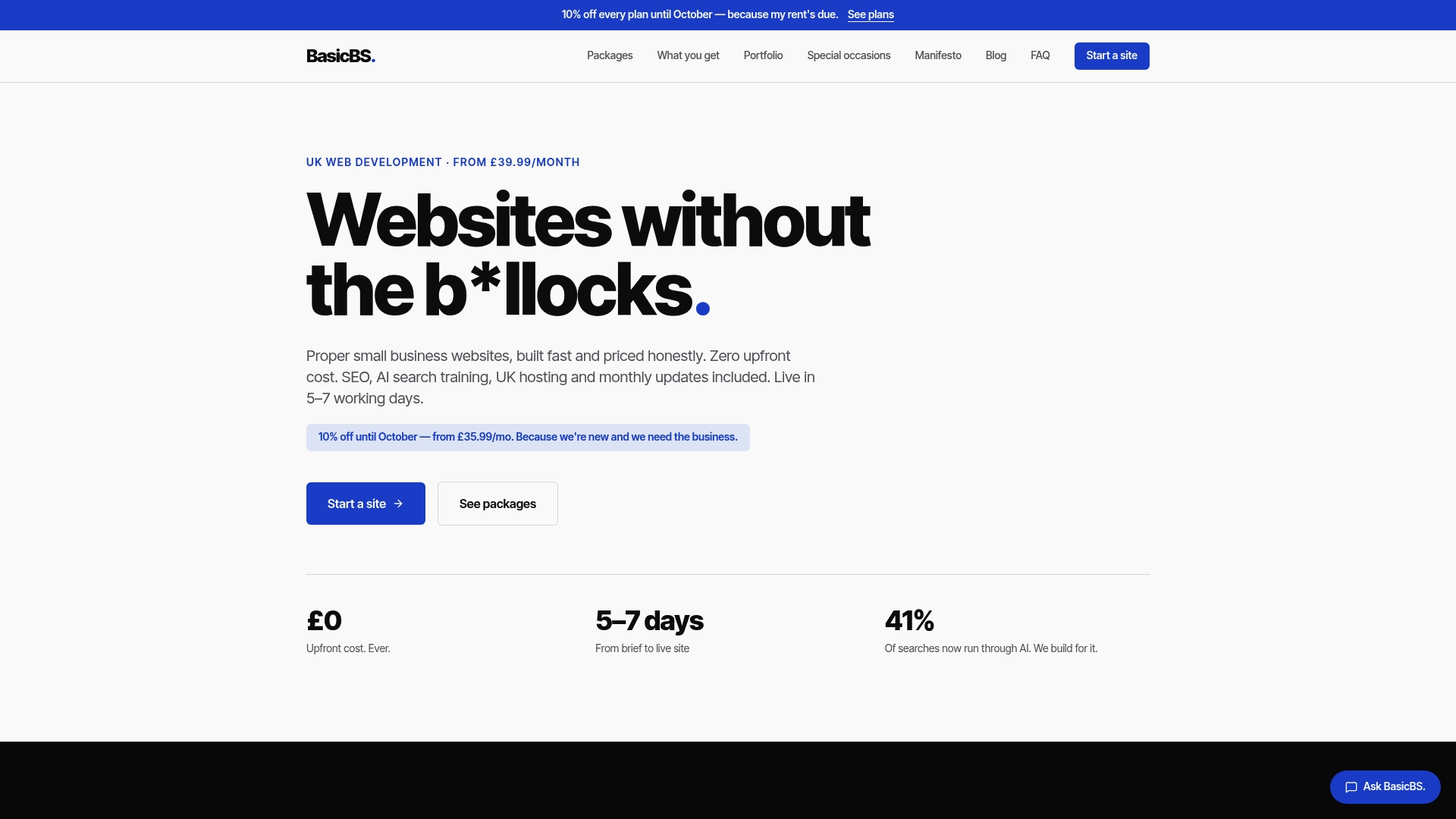
Basic-bs builds event websites with zero upfront fees, and sites go live in a matter of days rather than weeks. Every build includes managed hosting, AI search optimisation, and the option to password-protect the whole site for a private guest list. Weddings with a ceremony and reception running on different logic, branded corporate events, and any occasion where “off-the-shelf” just won’t cut it are examples of the kinds of events this service supports. Have a look through website examples and templates to see the sort of thing on offer, then get in touch for a straightforward quote. No jargon, no hidden setup fee, just a working site by the following week.
Sources
Further detail on building and running RSVP pages: a step-by-step RSVP site tutorial from Hostinger, practical RSVP collection advice from AddEvent, and guest-list planning guidance from Invyt and PlanSeats.
- Event RSVP website: collect guest responses online — Hostinger
- Guest list management for any event — Invyt
- Guest list management: an end-to-end guide for events — PlanSeats
FAQ
What is the best free way to RSVP to an event?
There’s no single “best” option, but the most reliable free RSVP pages combine a mobile-friendly form, clear confirmation messages and a host dashboard that updates in real time, exactly the features covered in the setup steps above.
What’s the best RSVP website for a wedding?
Look for party-level RSVP support, meal tracking and multi-event logic if your ceremony and reception have separate guest lists, since guest-list guidance flags these as the features that most reduce vendor friction for weddings specifically. If you need custom branding or password protection on top, a bespoke build handles that better than a template tool.
How do I get RSVPs for an event quickly?
Set your deadline against your tightest vendor cutoff, build a short mobile-friendly form with only essential fields, and share it as a link and a QR code together. That combination covers most guests without needing a second reminder channel.
What should I put on a wedding website?
At minimum: the date, venue, an RSVP form with a clear deadline, accommodation suggestions, and any dietary or plus-one questions your caterer needs answered before final headcount.
Is a paid RSVP tool worth it over a free one?
Only if you need something free tools genuinely can’t do well, such as full custom branding, complex multi-event logic, or password-protected private access. For a straightforward single-date event, a free tool usually does the job fine.