WhatsApp Chat Widget: 5 Minute Setup for UK Small Sites, PECR Ready
If you’re a sole trader, a plain wa.me link does the job in minutes. Small teams get more mileage from a no-code widget with custom pre-filled messages and business hours. Anyone scaling past 15 to 20 enquiries a day needs the WhatsApp Business API for multi-agent inboxes. Whichever you pick, remember one thing before you switch anything on: marketing messages need explicit opt-in under PECR, full stop.
TL;DR:
- A simple wa.me link can handle unlimited enquiries for sole traders efficiently without cookies or accounts setup.
- Small teams should consider no-code widgets with custom messages, but must verify their cookie and privacy compliance before going live.
- The WhatsApp Business API is mainly necessary for larger volumes exceeding 15 to 20 enquiries daily or for team automation.
- Explicit opt-in under PECR is mandatory for marketing messages, requiring clear consent and privacy policy updates.
- Tracking chat performance with GA4 and testing variations helps optimize conversions, with rapid response times crucial for lifting results.
Table of Contents
- What’s the fastest way to add a WhatsApp chat widget to my site?
- What should you customise for better chat pick-up?
- Do you need consent to run WhatsApp chat on a UK website?
- How do you measure whether the WhatsApp widget is working?
- How do the main website platforms handle WhatsApp widgets?
- What goes wrong with WhatsApp chat widgets, and how do you fix it?
- Publisher perspective: how Basic-bs implements WhatsApp chat for clients
- Want your WhatsApp widget set up properly, not bolted on?
- Sources
- FAQ
What’s the fastest way to add a WhatsApp chat widget to my site?
Right, let’s cut the rubbish and get you sorted. There are three genuine routes onto WhatsApp from your website, and which one suits you depends entirely on how busy your inbox already is.
1. The click-to-chat link (fastest, zero cost).
Build a link using wa.me/44XXXXXXXXXX or api.whatsapp.com/send?phone=44XXXXXXXXXX, swap in your business number, and paste it onto a button or your contact page. No plugin, no account setup beyond the free WhatsApp Business app, no cookies loaded on your site. It opens WhatsApp directly on the visitor’s phone or desktop app. Takes about five minutes.
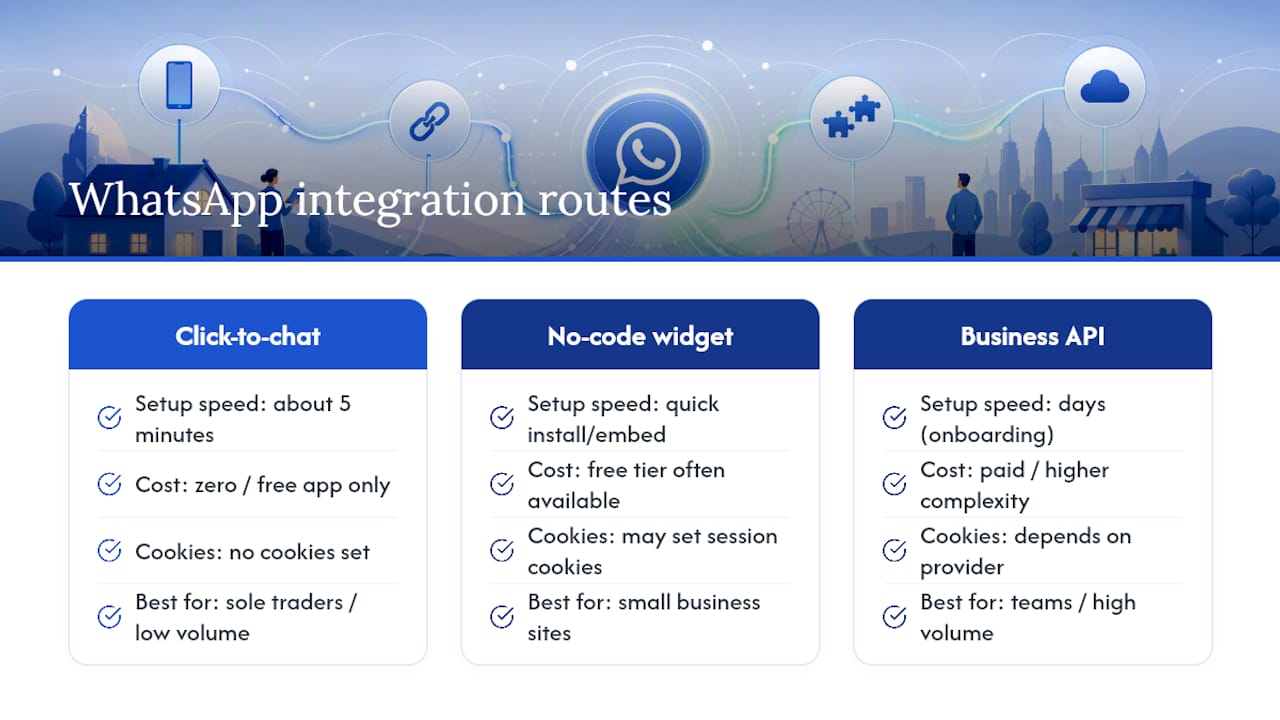
2. A no-code widget or plugin. This is the floating green bubble you see on loads of small business sites. Install a plugin (WordPress has several free ones) or paste a short embed script from a widget provider. You get more polish, pop-up prompts, custom icons and, often, a free tier to start with. The trade-off: some of these scripts set session cookies to manage widget state, so you need to check what’s actually loading before you go live. Plain wa.me links set no cookies, which is worth knowing if you’d rather sidestep the whole cookie-banner headache.
3. The WhatsApp Business API via a solutions provider (BSP). This is the grown-up version, built for teams. It lets multiple staff answer from one number, supports automated replies, and plugs into CRM or helpdesk tools. Onboarding usually means picking a BSP, verifying your business, and connecting it to your existing systems, which takes days rather than minutes. Practitioner guidance suggests the free app and a click-to-chat link cover sole traders fine, with the API only earning its complexity once volume and team size actually demand it.
What should you customise for better chat pick-up?
A WhatsApp button that just says “chat with us” wastes an opportunity. The wording, timing and placement all shift whether someone actually taps it.
- Pre-fill the message with intent. “Hi, I’d like to book a table for Saturday” converts far better than a blank chat window, because it tells the visitor exactly what to type and tells you exactly what they want.
- Put it where thumbs actually are. Bottom-right on mobile, always visible on product and contact pages, hidden on anything sensitive like a checkout or account settings page.
- Show business hours honestly. If nobody’s answering after 6pm, say so in the widget, and offer a fallback (an email form or booking link) so you don’t lose the enquiry entirely.
- Add a privacy line to the greeting. A short “we’ll only use your number to reply to this chat” builds trust and does some of your compliance heavy lifting for you.
Pro Tip: Test your pre-filled message on your own phone first. If it reads like a form field rather than something a real person would type, rewrite it.
Do you need consent to run WhatsApp chat on a UK website?
Yes, for anything marketing-related, and this is where most small business sites trip up. UK GDPR and PECR aren’t optional extras bolted onto WhatsApp. The Information Commissioner’s Office is clear that businesses need a lawful basis for processing personal data via messaging apps, and PECR specifically demands explicit prior opt-in before you send marketing messages.
Here’s your practical checklist, no legal degree required:
- Marketing needs an unticked opt-in box. No pre-ticked consent, no assumed consent from a chat enquiry. Recommended patterns include an unticked checkbox at contact points or a keyword opt-in via chat, such as texting “JOIN”, followed by a confirmation message you can point to later.
- Update your privacy policy. State that you use WhatsApp, why, and under what lawful basis, then link that policy from your chat greeting.
- Favour wa.me links for a cleaner cookie story. They dodge most ePrivacy headaches outright; widget scripts need a proper look before launch.
- Sort your operational plumbing. An opt-out route, a process for subject access requests and erasure, and clarity on who else (backups, third-party processors) might hold that customer data.
One nuance worth knowing: the DUAA 2025 clarified that functional first-party chat cookies may be exempt from consent rules, but advertising or attribution pixels sit outside that exemption entirely. Swap in your own WhatsApp cookie disclosures via our cookie policy as a working template.
How do you measure whether the WhatsApp widget is working?
Set up a GA4 event, something like whatsapp_click, and treat it as a micro-conversion rather than a vanity metric. Capture the referring page and any UTM parameters when the chat opens, so you know which campaign or page actually drove the enquiry.
- Create the click event and mark it as a conversion in GA4.
- Tag campaign links with UTM parameters before they go live.
- Benchmark against reality: aggregated data shows adding chat typically lifts conversions by around 20% sitewide, but only when replies come quickly. A widget nobody answers for six hours delivers none of that lift.
- Run small experiments: swap your pre-filled message, test showing the widget only during business hours, and see which version gets more genuine enquiries rather than just more clicks.
How do the main website platforms handle WhatsApp widgets?
Every platform does this slightly differently, so here’s the short version for each.
- WordPress: install a free WhatsApp chat plugin from the repository, or paste embed code directly into your theme’s footer via a code snippets plugin. Either takes under ten minutes.
- Shopify: most themes accept embeds through the “Custom HTML” section in the theme editor, or you can install a chat app from the Shopify App Store that handles the widget for you.
- Wix and Squarespace: use the built-in custom HTML/embed element from the site builder’s add-on panel, drop your code in, then always preview on an actual phone before publishing. What looks fine on desktop can sit awkwardly on mobile.
- Plain HTML or custom-built sites: paste your wa.me link into a button, or drop in a vendor’s widget script just before the closing body tag. Test across a couple of real devices, not just your browser’s mobile emulator.
What goes wrong with WhatsApp chat widgets, and how do you fix it?
Most problems aren’t technical. They’re operational.
- Nobody’s clearly responsible for replying. Decide who answers, set a realistic response time target, and stick to it. Speed genuinely drives conversion here.
- Customers get added to marketing lists without asking. Keep enquiry replies separate from marketing, and only send promotional messages to people who’ve given documented, explicit opt-in under PECR.
- You’ve outgrown the phone app and don’t realise it. If replies are getting missed or delayed because one person can’t keep up, that’s your signal to move to an API-based multi-agent inbox.
- Nobody tested the actual flow before launch. Send yourself a test message, check the privacy link works, confirm the opt-out route functions, and check what cookies actually fire.
Pro Tip: Run your pre-launch checklist the week before you go live, not the morning of. Cookie consent bugs have a habit of surfacing at the worst possible moment.
Publisher perspective: how Basic-bs implements WhatsApp chat for clients
WhatsApp is often integrated into client sites as part of the web design process, rather than added later. For many small businesses, a wa.me link is recommended over a managed API integration, purely because many don’t need the complexity yet. When a site is built, privacy policy wording, cookie disclosure, GA4 event tracking, and a staff briefing on reply expectations are often handled to ensure completeness.
— Conor
Want your WhatsApp widget set up properly, not bolted on?
WhatsApp integration is typically included from the start rather than treated as an add-on to be sorted out later, avoiding delays and unexpected cookie-banner issues due to unchecked widget scripts.
We handle the GA4 tracking, the privacy policy wording, and the cookie disclosure alongside the actual build, all part of the same fixed monthly package with zero upfront fee. If you’re weighing up a cheap website build that skips this stuff entirely, have a look at our portfolio to see how it looks done properly, then get a quote for a website that includes it from the start.
Sources
For the official word, see ICO guidance on marketing and cookies, WhatsApp’s Business Data Transfer Addendum, and practical DUAA 2025 compliance commentary.
- WhatsApp Business - Chat Widget Consent Guide | ConsentStack
- How do you add WhatsApp Business to your website and marketing — Lilach Bullock
- Does WhatsApp chat increase sales? 2026 Data & Benchmarks — WPChatHelp
FAQ
How can I add a WhatsApp chat widget to my website?
Paste a wa.me link onto a button for the fastest route, install a no-code plugin for more styling options, or connect the WhatsApp Business API through a BSP if you need a multi-agent inbox.
How do I create a chat widget?
Most small businesses don’t build one from scratch. They install a free plugin (WordPress) or paste a short embed script from a widget provider, both of which typically take under twenty minutes.
What is a WhatsApp widget?
It’s a chat button, usually a floating icon, that opens a WhatsApp conversation with your business number directly from your website, rather than requiring a visitor to save your number first.
How do I put WhatsApp chat on my home screen?
That’s a separate step from your website widget: visitors can open a chat, then use their phone’s browser or WhatsApp menu to add that specific chat as a shortcut on their home screen.
Do I need a WhatsApp Business API for a small website?
Not usually. A free WhatsApp Business app paired with a click-to-chat link handles most small businesses fine, and the API only earns its cost once you’re fielding upwards of 15 to 20 enquiries a day.